Workflows
A pipeline an agent follows for each task: plan, build, checks, review, pull request.
Turn workflows on
Off by default: Settings, then Features.
- Workflows adds a Workflow tab to each agent and a top bar button.
- Whether a step asks you is set on the step, in the builder. A plan waits for your approval before the agent edits unless its gate is auto; any other step can ask you first. There are no switches for it in Settings.
- The dial sets how much care each task takes: The three dials.
An agent gets the workflow tools only when it starts, so one that was already running when Workflows was switched on, or when its project's workflow file last changed, does not have them: no task is recorded for it. A warning card at the top of the Workflows window and of the agent's Workflow tab names those agents and has a button that restarts them. It is gone once none is left.
How a workflow reads now: a workflow file says what to do and where you are asked, nothing more. It holds no command: the agent runs the tests and does the review itself, in the chat, as steps of its own. A file that still has a check or an audit step is read as an ordinary agent step, and its command is not run. A step asks you at most once, before it starts (Asks me first), and the agent does nothing for it until you say yes. The plan is the one step you answer after it is written. The agent reports its steps in order; an optional step that does not apply is shown as skipped, not done.
What an agent does with a workflow
The default is Standard (Plan, Build, Audit, Pull request), or your pick for the project. For one task the agent:
- Tells the office it began a task, which opens a run. Each turn without one adds a reminder.
- Writes a plan to
.agent-world/plan.md(goal, assumptions, out of scope, questions). - Waits for your approval, then builds.
- Has any check steps run, and its branch reviewed against the plan (not at Economy).
- Is told to open the pull request once the audit has passed and, when the step's gate asks for it, you approved (the app says so in the chat, so you do not have to ask): it pushes a branch whose head is exactly the audited commit, under any name. Commits go on its own branch only; a commit on another branch of its worktree is refused, and a push of a branch with other commits is held.
While a run is open, a new request the agent announces is an item of that run, not another run: one track, one audit of the whole branch, one pull request. The agent is told to rewrite its plan to cover the item and call plan_submit, which you approve as the whole plan. The Workflow tab lists the items. A task begun after the run was done, landed or stopped, or a request that continues the last task (follow_up), is as before.
A commit with no announced task gets a run marked from a commit, in the Not announced group, with no workflow, plan hold or track. It joins the agent's todo.
Use no workflow in a project
In the Workflows window, select Standard and click Remove. Agents in that project then work as if workflows were off: no task is recorded, nothing is held (no plan hold, no track, no gate), no reminder is added and no run starts from a commit. It is a choice for that project only; Restore Standard undoes it, and making another workflow the default also ends it. Runs already open finish as they were.
Enforced and only asked
Announcing a task, handing in a plan, reporting steps and saying done are only asked. The app holds:
- Edits until the plan is approved: by a hook for Claude agents, by a plugin for agy agents. A shell command such as
sed -iis caught at the commit instead. - Commits until the plan is approved, and, while the gate holds it, a push of its branch (a Pull request step) or a merge into the base branch (a Land step): by git, for every program.
- Checks and the review: the app runs them.
- The pull request: git holds the push unless the gate is met or you Set aside what holds it. A push that goes through ends the run.
- Approval: a step that asks first (a pull request step set to Asks me first, or a plan whose gate is not auto) shows the same card as any step you approve, with Approve and Send back. Nothing is pushed and the agent is not told to push until you approve; a commit made after your approval asks again. With gate auto the app acts at once and the bar says what it is doing. A merge needs no second approval: your click on Land is it.
- A push the app did not see (git run with its settings off) is noticed when the audited commit shows up on a remote branch: the run is recorded as pushed without the hold, and the bar moves on.
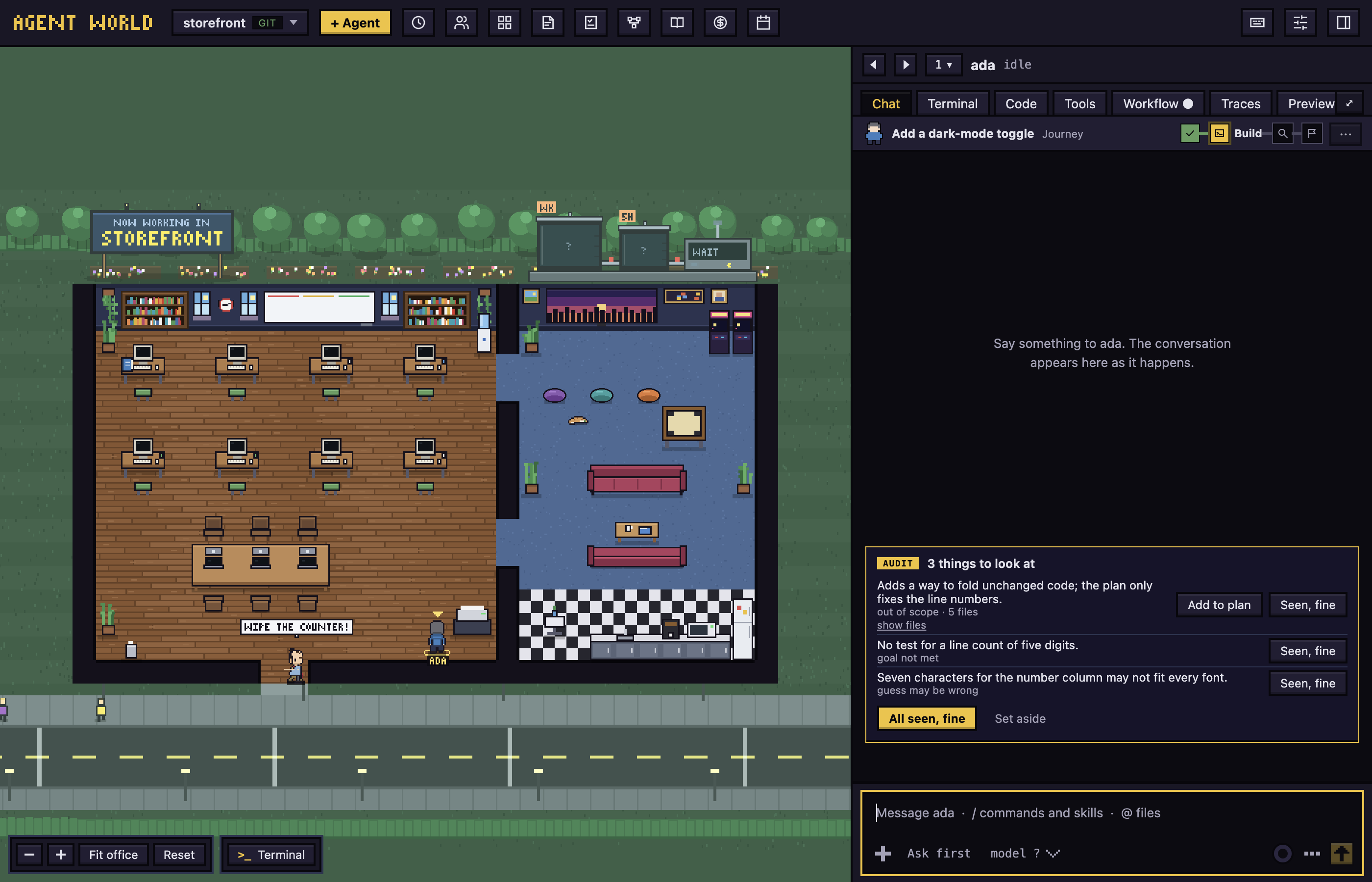
The audit starts by itself, once, when the agent's steps before it have passed. It is one model call, so a run that commits again later is not audited again by itself; if git then holds the merge, its card has Run the audit. What waits for you shows as a pill beside the agent (PLAN, APPROVE, CHECK?, AUDIT, LAND), in the agent switcher and under "others waiting", and the agent raises a hand in the office.
Findings to look at show as a card at the end of the agent's chat. The reviewer reports one row per cause, with every file it covers (show files). Each row has Seen, fine, and out-of-scope work also has Add to plan: it stays in scope for later audits and counts as seen. All seen, fine answers every row, and Set aside the whole audit. Nothing sits above the message box and nothing opens by itself. Set aside records the audit as not followed (the track and the ledger say so), and nothing it found holds the merge; a line in the chat has Undo.
Limits:
- An agent that unsets git's environment variables, sets its own
core.hooksPathor pushes with--no-verifygets past the git holds; a skipped push is still recorded as pushed anyway. - Only a task's first round is held for its plan, and not when the plan step's gate is auto.
- The Merge into main button in the Code tab applies no gate. To land through the gate, ask the agent to merge.
Follow a run: the track
While a run is open, a track sits above the agent's chat: its steps as stations, with the agent's figure on the one it has reached. A station is met, met after trouble (with a retry count), failed, here now, not yet or not asked. The agent's Workflow tab shows it with a tile for each run this week.
The same button is in the agent's chat, so no tab has to be opened for one click: a Your turn to run card holds Run (and Skip this check) for a check, or Run audit for the audit, and a pull request that starts on Run shows Run on its approval card. In the Workflow tab the run is a Flow (the default): the same cards the builder draws, read-only, with where each step stands (done, working, needs you, press Run, later, not asked, failed) and the button to press on the card that waits for you. Rail is the thin track above. A step that starts when you press Run says press Run: Run starts a plan, a build or a check (the agent is told to begin, and edits nothing before), Run audit asks the reviewer, and a pull request that starts that way shows Run (nothing is pushed before you press it). A step that waits for your approval shows Approve and Send back, with a note for what should change; an optional step also shows Skip. Nothing starts by itself on a step you set to Asks me first.
A step can be yours to finish, for a check only a person can make, such as trying the change: in the builder, set Who finishes it to Me (in the file, "by": "person"). The agent does what the step's description says (start a test instance, give the test prompts and the steps to take), reports the step, and one card asks you for your verdict: Approve and Send back (a note for what to change), or the words the step gives them with Done button and Send-back button ("confirm" and "reject", up to 40 characters each). Such a step does not ask you before it starts, and nothing else shows a card for it. A step can be Optional (the agent may skip it itself and say why; you can skip it too) or Skippable (only you can skip it, and the agent has to ask). A step that starts when you press Run is Skippable unless its workflow says otherwise, so its Run and Approval cards have a Skip button beside Not now; a step with neither flag is required. In the builder, a picked step's settings open in a card beside the flow: icons for who does it, the title and description as plain text, and the rules as chips (Asks me first, Optional, Skippable). A step you press Not now on is skipped if it is optional, and refused if it is not: it shows red, the steps after it wait, and the agent is told. A refused step asks what next: a card in the chat names the refused step, lists the steps still to come, and offers Skip it and continue (the steps after it go on; only for a step that can be skipped), Ask again later (it stays red, and the agent can ask again when more work arrives, and the strip and the flow card have Ask again) and Stop here (the run ends).
When a task needs no commit, push or pull request, the agent asks once: a Skip these steps? card lists the steps and its reason. If nothing in the run was done and every step would be skipped, the card says No workflow needed, and Drop this run removes it from the lists (Keep it and skip the steps keeps a record). The agent is also told not to start a task for a read-only check or a question, and Skip all three skips them together, or Keep them leaves them. Nothing is skipped until you press it. If a run cannot go on, open it in the Runs tab and press End this run: what is left is set aside and the agent is told to stop.
Opening a run in the Runs tab shows it in a panel beside the table: a row of numbers (rounds, commits, wall time and cost), End this run when it is still open, and the run's steps as a strip of segments, one for each step, coloured met, skipped, failed or waiting for you. Press a segment to see only that step's events; press it again to see them all. Above the story, All events and Only trouble switch between everything and only the lines about a failed command. The story is in the order it happened: each step, the work added to it (and the step it was at), the person's Run, and the commits, which fold into one line that opens. A failed git, test, build or lint command is a red line with a label (identity, network, permission, hook, tests, build, lint) that opens to the command and what it said. The run's flow chart sits beside the story when the panel is wide, and behind Show the flow (then Hide the flow) when it is narrow; the commits are listed under it with a tick for those made under an open task. Hide closes the panel. Work added to a run is drawn in the flow as its own branch of steps (marked item 2 and so on): it leaves the main chain at the step the run had reached and rejoins it at the first step all the work shares, and each card says what it is for. A command that failed shows on its step's card and in the strip above the chat.
A card that asks you something (Run, Approval, Skip these steps?, a refused step) folds with its chevron to one line: its tag, its title, the first words of what it says, and the same buttons. Opened, it has Add a comment: an optional note that goes to the agent with the button you press, and shows under the title in your chat. Editing a workflow with the builder keeps its conversation when it is the workflow the builder was last on; otherwise it starts clean, and nothing is typed for you: what the builder needs to know about the workflow rides on your first message.
Approve a plan, checks and steps
- A Plan gate panel opens in the chat. Answer the open questions (a plan with none says the agent asked no questions), click + Add a note for name for a note that goes with the approval, then Approve plan, or Request changes and Send back. Let name edit without approval lifts the hold.
- A check step is a command the app runs in the agent's worktree, with a 5 minute limit. A project's commands need Approve and run (or Don't run) first, and again after the file changes. A failing check goes back to the agent, twice by default, then Run again or Skip this check.
- A your approval step waits for Approve or Send back.
Open the pull request
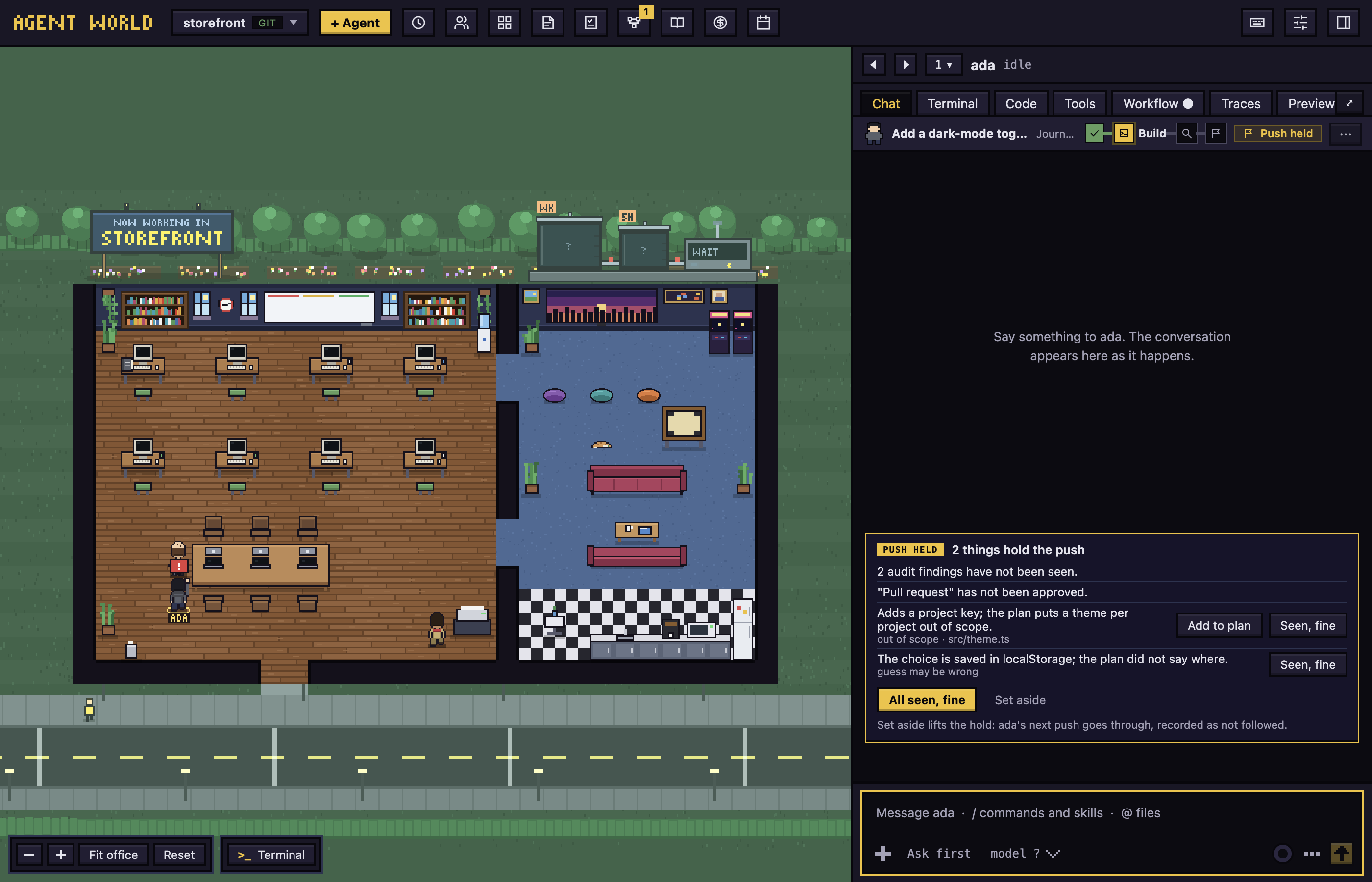
Ask the agent to push the branch. If the gate holds it, git refuses, the agent tells you why, a Push held marker is on the run track, and a card at the end of the chat lists what holds it, such as an unapproved plan or N audit findings have not been seen. Then either:
- Click All seen, fine for the findings, then ask the agent to push again.
- Click Set aside. It lifts the hold, so the branch goes through once, on the agent's next try, and records the audit as not followed.
A branch that shares no history with its base (the base was rewritten) cannot be landed: a red line at the end of the chat says to reset it onto the base. A failed review never holds it. Checks and steps that need you hold it whatever the pull request step says.
The Workflows window
- Runs: for 7 days or 30 days, four number tiles (runs, how many are still open and how many wait for you, the time you waited, and the cost), then two charts: Workflows invoked and Runs per day, each day stacked by how its runs stand (clean, needs you, failed, skipped something). Under them a table of runs grouped as Needs you, Still open, Landed with trouble, Landed clean, Stopped and Not announced, each row with a thin strip of its steps. Click a run to open it in a panel beside the table.
- Insights: what keeps going wrong, workflow by workflow. Each workflow shows how many of its steps were met ("75 of 92 steps met") and a card for each step that was skipped or failed, worst first, with how often, when it happened over the runs, and the reason given most often. Three cards show; Show all opens the rest. Press a card to open the newest run it happened in.
- Workflows: the project's workflows, the chosen one's steps drawn as a flow (read-only) and its History: what was saved to it through the builder.
Make or change a workflow
- Click + New workflow, then Describe it to the builder… (type a sentence and click Start) or Blank workflow to start empty. To change a saved one, select it and click Edit with the builder: a fresh chat starts with it as the draft, and the page is titled Editing and its name. Copy and delete are under More.
- The builder only proposes. Talk to it, or edit the draft. The steps are drawn as a flow, top to bottom, a card for each: who does it (the agent, a command, a reviewer, or you) with its name, what it is told, and where it stops. Dashed lines show the loops back (a check that is tried again, work sent back). Click a card to change its name, brief, a check's command, Tries, stop and skills (the fields open beside the flow, or under it in a narrow panel). A skill is added with the same picker as the Playbook's: a search over names and descriptions, the skills grouped by where they came from, and a skill the step already has shown dimmed. On the canvas itself: drag a card to move it; draw an arrow from the dot under one step to the dot over another to put it right after; the + on an arrow adds a step there (Add a step adds one at the end); Delete takes the picked step out. Move up, Move down, Duplicate and Remove are under the fields too. In a narrow panel the same steps are a plain list. Every step has the same settings, whatever it is. Who does it: Agent, Command (the app runs it), Reviewer (a model reads the branch) or You; changing it keeps the name, the brief and every setting the new one also has. A brief (the agent is told it, a reviewer is told what to look at, and it shows on the card). Part in the run: for an agent step, a step of work, the plan you approve before any edit, or the pull request that is held until the steps before it pass; for a step of yours, an approval or landing it into the base branch. Then two moments you can hold a step at. Before it starts: the Asks me first chip (off, it goes ahead by itself), for any step the agent, a command or a reviewer does; a step like "Generate plan" then does not begin until you press Run, and the agent edits nothing before. When it is done: Needs my approval (the run waits for you to approve it or send it back before the next step; a check you approve has to pass first) and Must pass (a command). Optional lets you skip it and the run goes on. Skills can be named on the plan, work and pull request steps, and a reviewer takes a Reviewer model. You edited N things counts your changes; Undo edits goes back to the proposal. Under the steps, Preview says for each one what it will ask of you and where you stop; it follows your edits.
- Saving waits while the draft has a problem. Click Save to the project, or Save for everything; saving approves exactly the commands the draft lists.
To reuse a workflow from another workspace, click Import… beside + New workflow. It lists the other workspaces, each with the workflows it keeps itself (the ones shared for everything are already here). Choose where to keep it, This project or Everything, then click the workflow: it is copied as a new file, under a new id if that one is taken, and the original is not changed.
A run and its todo
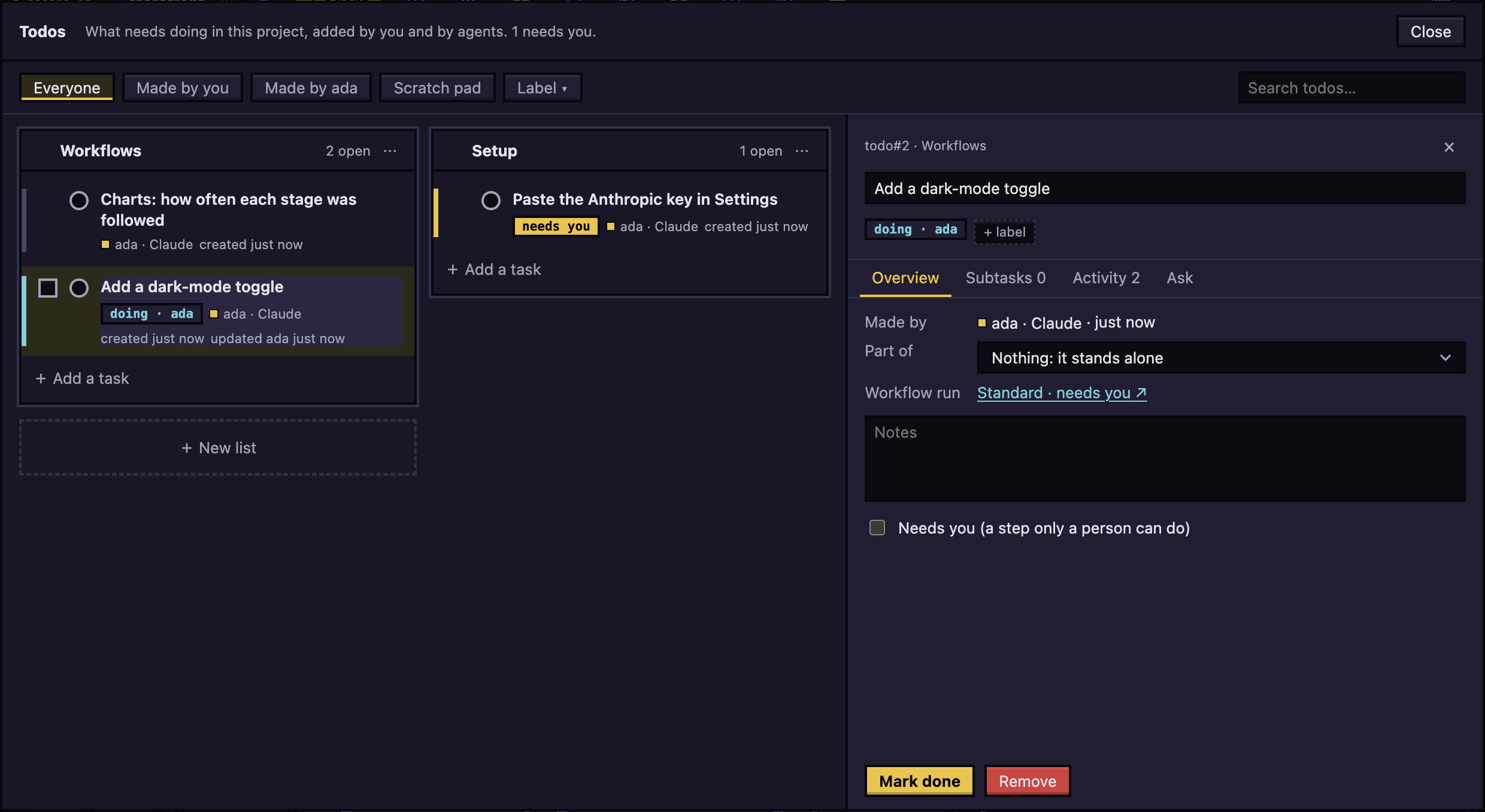
A run begun while its agent is on a todo belongs to that task:
- The Runs ledger shows a
todo#Nchip. Click it to open the task. - The task's Workflow run section says how the run stands, in the ledger's own words (such as still open). Click it to open the run.
- Finishing the run finishes the task, if the agent has not.
The three dials
- Economy: the plan may be skipped for a one-sentence change; no review.
- Balanced (default): a plan every time; a small model reviews the branch.
- Max: also a larger reviewer, and a check of your request against the plan.
Next: Library and playbook